 Vexor Core Studios
Shop Stormwall

Stormwall
by Vexor Core Studios
Shader-rendered world borders for Paper: circles, polygons, cubes and domes that shrink, move and rotate smoothly, drawn on the player's GPU with almost no server cost.
Compatibility
- Minecraft
- 1.21.11, 26.1, 26.2, 26.3
- Runs on
- Paper
- Licence
- 1 server, IP-locked
- Latest
- v1.0.7
Try it live: demo.the-best.uk
Overview
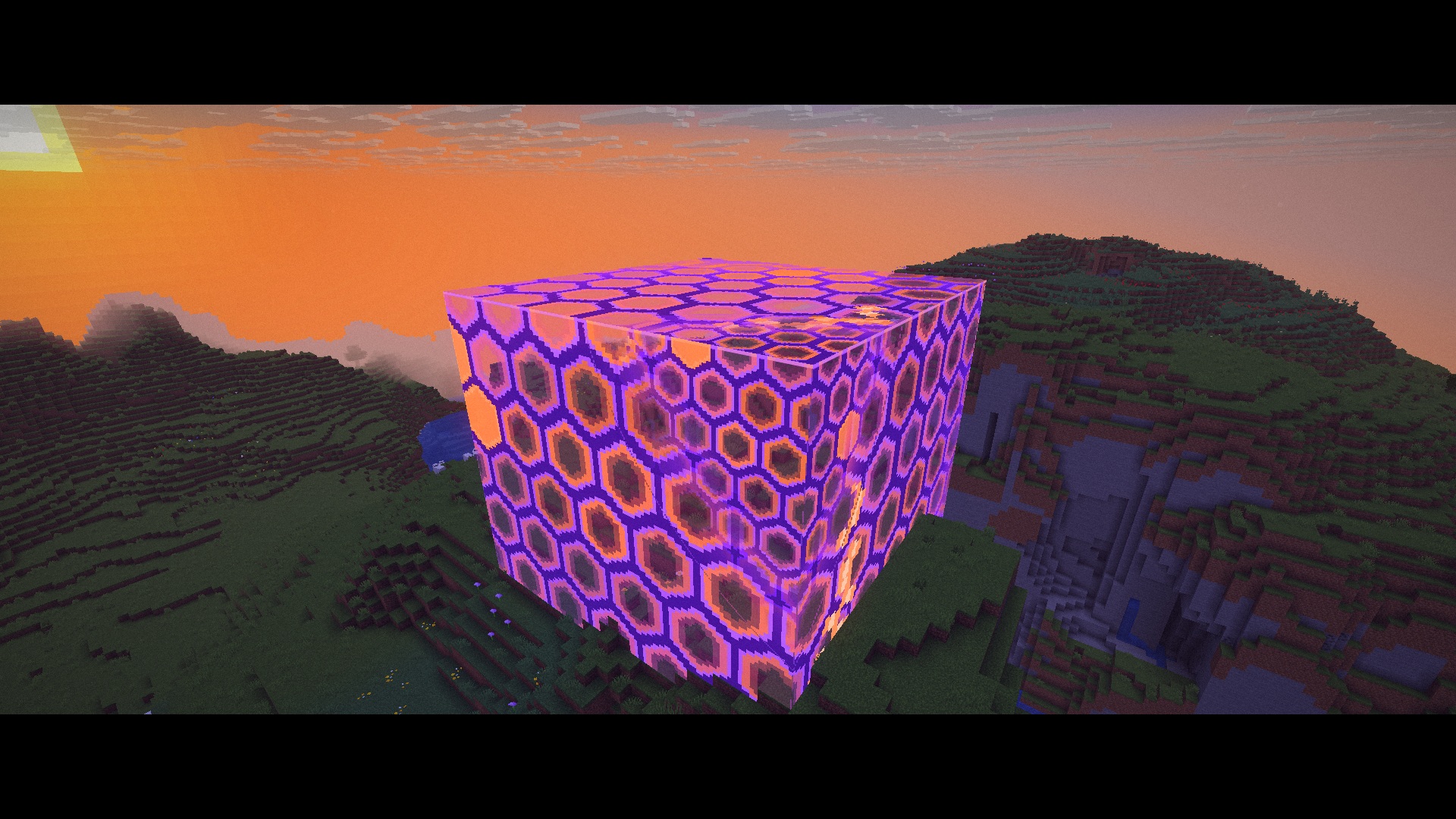
Stormwall replaces the vanilla world border with animated storm walls rendered by core shaders. Borders can be circles, polygons, cubes or domes, and they can shrink, move, rotate and change shape over time.
The walls aren't made of particles or blocks. They're drawn on the player's GPU by a resource pack the server sends when they join, so they stay smooth and cost the server almost nothing, even at a radius of 2,000 blocks.
Shapes
Circle, ellipse, rectangle, diamond, triangle, pentagon, hexagon, octagon, rounded square, stadium, star and cross. Any shape can be rotated, and a storm can change from one shape to another while it's running.
Themes
Lines, Hex, Grid, Plasma, Dots, Static, Glass, Storm, Aurora, Fire, Matrix and Royale. Every theme takes a custom colour and opacity. Like the vanilla border, the pattern gets finer as you move away from it, and the wall fades out beyond your render distance.
Floors and ceilings
Give a storm a floor, a ceiling or both to turn it into a cylinder, cube or dome. Floors and ceilings move independently of the walls, so a zone can close in vertically as well as horizontally.
Phases
- Shrink, grow, move, rotate or reshape a storm over any length of time, set in ticks, seconds or minutes.
- Chain phases together with presets. A battle-royale preset is included.
- The wall's colour shows what it's doing: green while growing, red while shrinking, purple while moving, with blended colours for combined motion. All of these can be changed.
- Optional light pulse along the wall when a phase begins.
- Boss bar showing the current phase, time remaining and distance to the edge.
Damage and rules
- Damage that increases the longer a player stays outside, with optional extra damage per block outside and a maximum per hit.
- Optional damage to mobs outside the border.
- Stop ender pearls and chorus fruit from landing outside.
- Stop building and breaking outside, including buckets, item frames, paintings and armor stands.
- Remove dropped items outside the border, or push them back inside.
- Configurable title and action bar warnings when a player leaves the zone. These can be turned off entirely.
Audiences
A storm can apply to everyone, or only to specific players, teams or permission groups. Several storms can run in the same world, so separate arenas can each have their own.
World borders
Each world gets a Stormwall border on first start, sized to match its existing vanilla border. The /worldborder command keeps its vanilla syntax (set, add, center, damage, warning) and adds shape, theme and color. Changes other plugins make to the vanilla border are copied over.
Commands
All commands have tab completion. When no storm name is given, a command applies to the storm closest to you. Help is available in-game, and every option is also in config.yml.
Developers
- PlaceholderAPI placeholders for distance to the edge, inside/outside status, phase, time remaining, radius and damage.
- A Java API for creating, editing and animating storms.
- Events for entering a storm, leaving it, and taking damage from it.
Compatibility
- Paper 1.21.11 to 26.3
- OpenGL and Vulkan on all supported client versions
- No client mods. The resource pack is hosted for you and sent automatically.
- Players who decline the pack don't see the walls; the border still works normally for them.
Requirements
- Paper or a Paper fork, 1.21.11 to 26.3
- Java 21 or newer
- PlaceholderAPI (optional)
Supported versions
- Server: Paper 1.21.11 – 26.3 (Java 21). Folia is not supported.
- Clients: Minecraft 1.21.11, 26.1.x, 26.2 and 26.3 (OpenGL and Vulkan, including 26.3 Improved Transparency).
- Optional: PlaceholderAPI.
Command cheat-sheet
/sw (aliases /stormwall, /storm) needs stormwall.admin. The storm name is optional; commands use the nearest storm.
/sw create <name> [shape] [radius]   make a storm around you
/sw radius <size> [time]             resize, e.g. /sw radius 50 30s
/sw center here|<x> <z> [time]       move the centre
/sw floor|ceiling <y|here|none>      add a floor or ceiling
/sw shape <shape>  /sw theme <theme> change the look
/sw damage <amount> [every]          damage outside the border
/sw start <storm> <preset>  /sw stop run a shrinking preset
/sw info | tp | list | reload
/worldborder ...                     vanilla syntax, drives each world's border
Bypass permission: stormwall.bypass.
Config excerpt
world-borders:
  enabled: true
  replace-vanilla: true
  shape: rectangle
  theme: lines
  color: "#20A0FF"
  solid: true
bossbar:
  enabled: true
  shrinking: "<red>Storm closing <white><time></white>"
render:
  update-ticks:
    moving: 4
    idle: 40
  storm-tint: true
Gallery
Reviews
No reviews yet
Reviews come only from people who own this plugin. Be the first once you've tried it.
Only verified buyers can review.